
Claimity API
API Documentation
Technical reference and guides for integrating with Claimity.
Overview
The API uses HTTPS methods and RESTful endpoints to create, edit, and manage resources in the system. JSON is used as the exchange format.
First Steps
This API offers comprehensive access to core functions. Whether integrations, automation, or custom applications – the API provides flexibility for connecting Claimity to your systems.
Interface Extension
- •Check the changelog regularly to stay up to date.
- •Breaking changes are announced in advance.
- •You will be informed in good time about significant changes.
First Steps
How to start with the API:
Create Key Pair
As an organization admin, you can create a key pair in the organization settings of your Claimity account. Subsequently, download the Private Key and keep it safe.
Authenticate
Using the created key pair and your Client ID, you can authenticate yourself against the Claimity API and thus obtain an Access Token for your requests.
Prepare DPoP Header
To send a request to the API, it is necessary to create a DPoP header. This header is signed with the Private Key and secures the request against potential security risks.
First Request
Send an authenticated request to an endpoint with your Access Token and the DPoP header.
curl -X GET \
  https://app.claimity.ch/v1/experts/cases \
  -H 'Accept: application/json' \
  -H 'Authorization: DPoP {access-token}' \
  -H 'DPoP: {dpop-header}'
Python Notebooks
For a quick start, we provide Python notebooks with which you can execute API queries and view the responses directly.
View Notebooks on GitHubReport Issue
If you have encountered an error, we will help. Ensure beforehand that the problem is reproducible.
Before Reporting
- ✓Check reproducibility
- ✓Perform API tests with Postman/Insomnia
- ✓Collect details on request and response
- ✗Do not send access data in the report
Submit Report
Please describe steps to reproduce. Our support will check the case promptly and get back to you as soon as possible.
Report IssueNote: The API is provided based on this documentation. There is no guided implementation or code support.
Changelog
All changes and updates of the current API version at a glance.
New: case amounts. Claims (insurers) and cases (experts) carry CostEstimateAmount (cost estimate), ApprovedAmount (amount approved by the expert report) and SavingsAmount (savings = estimate − approved amount, only when positive) in list and details – all in CHF, null = not entered. Experts set the amounts with PUT /v1/experts/cases/{caseId}/amounts (204). Changing an amount advances LastChangedAt. The extension is backwards compatible.
Reworked the sync filters: updatedSince is now lastChangedSince (both endpoints /v1/insurers/claims and /v1/experts/cases) — the filter now carries the name of the field it filters (LastChangedAt). New: lastReportApprovedSince on /v1/insurers/claims returns only claims whose latest report approval is at/after the given instant (claims without an approved report never match). completedFrom/completedTo are unchanged and filter the moment of the most recent completion.
Expert API: new endpoint to reopen a completed case (POST /v1/experts/cases/{caseId}:reopen, returns 204). List endpoints gained filters (free-text search q, created/completed date ranges) and an updatedSince cursor for incremental sync. Cases now expose LastChangedAt; claims additionally expose LastReportApprovedAt. Create and upload endpoints now return 201 Created. Every response now returns an X-Correlation-Id header (echoing a valid inbound one) for end-to-end tracing; on errors it is also the ProblemDetails instance.
Added new "Special Appraisals" category including schema and payload structure.
Addition of a new endpoint to the insurer API for validating the case structure.
First API version published.
Authentication
The Claimity Partner API uses OAuth 2.0 Client Credentials with JWT Client Assertion (RS256) and additionally secures every request with DPoP Proof-of-Possession (ES256). The Access Token is bound to your DPoP key (cnf.jkt): use one key for the whole session — the token request and every API call — and sign the token request itself with a DPoP proof.
Authentication Flow
How the OAuth2 Client-Credentials Flow works.
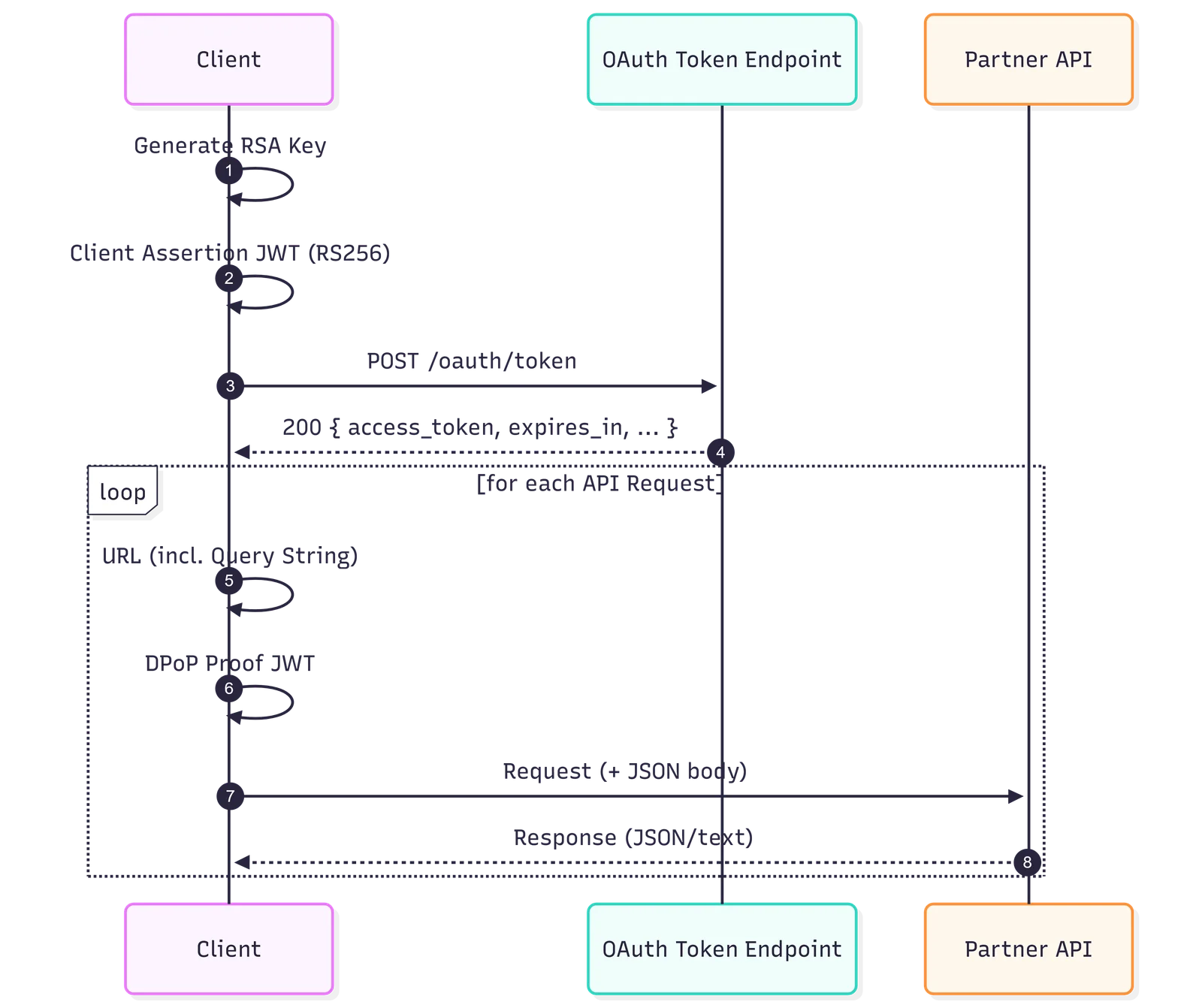
Process
- Key Pair: Organization creates RSA Key Pair in Claimity (Private Key is stored securely).
- JWT Client Assertion: Client generates a short-lived JWT (RS256).
- Token Request: Client sends POST /v1/oauth/token (Client-Credentials + Assertion) with a DPoP proof, which binds the issued token to the DPoP key.
- Validation: Auth server checks signature of the assertion and permissions and returns Token Response.
- Query URL: The client creates the query URL (incl. query parameters).
- DPoP Proof: Client creates a DPoP JWT (ES256) per request bound to method + URL, signed with the same key used for the token request.
- API Call: Client calls endpoint with Authorization: DPoP access_token and DPoP: ….
- Response: API checks Token/DPoP and processes the request / returns the response.
Read Access Token
For partner integrations, your organization authenticates via a signed JWT Client Assertion.
Prerequisites
- •Client ID (e.g. org-expo-00001) readable from Claimity organization settings
- •Private RSA Key from Claimity organization settings (keep safe and never share)
Token Endpoint
| URL | POST https://app.claimity.ch/v1/oauth/token |
| Content-Type | application/x-www-form-urlencoded |
| Form Fields | grant_type = client_credentials client_id = <Your client id> client_assertion_type = urn:ietf:params:oauth:client-assertion-type:jwt-bearer client_assertion = <JWT (RS256)> scope (optional) |
URL
Content-Type
Form Fields
JWT Client Assertion (RS256)
The assertion is a short-lived JWT (10 minutes) and is signed with your RSA Private Key.
- •iss/sub = client_id
- •aud = https://app.claimity.ch/realms/claimity/protocol/openid-connect/token
- •jti = UUID (unique)
- •iat/exp = “now” / “now+600s” (10 min)
- •kid (optional)
curl -X POST \
  'https://app.claimity.ch/v1/oauth/token' \
  -H 'Content-Type: application/x-www-form-urlencoded' \
  -d 'grant_type=client_credentials' \
  -d 'client_id=org-expo-00001' \
  -d 'client_assertion_type=urn:ietf:params:oauth:client-assertion-type:jwt-bearer' \
  -d 'client_assertion=<RS256-JWT-CLIENT-ASSERTION>' \
  -d 'scope=roles'
Token Response
The response contains an access_token. Important: For API calls, this token is used as a DPoP Token.
Send API Requests
Every request additionally requires a DPoP Proof JWT. A fresh proof is generated per request and signed (ES256) to bind the request to method + URL, but always with the same key the Access Token is bound to (cnf.jkt). A proof signed with a different key is rejected with 401 "Access token is not bound to the DPoP proof key".
Required Headers
| Authorization | DPoP {access_token} |
| DPoP | {dpop_proof_jwt} |
| Accept | application/json |
| Content-Type | application/json |
Authorization
DPoP
Accept
Content-Type
DPoP Proof Content
- •htu must be the exact URL incl. query string
- •htm must correspond exactly to the HTTP method (GET/POST/PUT/DELETE)
- •jti must be new per request (no replays)
- •iat must be within the allowed time window (avoid clock skew)
- •ath = base64url(SHA-256(access_token))
curl -X GET \
  'https://app.claimity.ch/v1/experts/cases?page=1&size=50' \
  -H 'Accept: application/json' \
  -H 'Authorization: DPoP {access_token}' \
  -H 'DPoP: {dpop_proof_jwt}'
Troubleshooting: 401 invalid_dpop
Common causes:
- •not bound: request signed with a different key than the token — reuse the single session key and send a DPoP proof on the token request
- •htu mismatch: URL must be exact incl. query
- •htm mismatch: Method must match
- •iat outside window: Correct system time
- •replay: jti must be new per request
- •ath mismatch: SHA-256(access_token) base64url
Correlation ID
Every response returns an X-Correlation-Id header. Claimity uses the same id in its server logs and, on errors, as the instance field of the application/problem+json body — log it and include it in support requests.
You can also supply your own id to trace a request end-to-end: send an X-Correlation-Id request header with a short, printable token (≤ 80 characters). A valid value is echoed back unchanged; an invalid or oversized one is ignored and Claimity generates its own. The correlation id is independent of DPoP (the proof binds only method + URL), so adding this header does not affect signing.
API Basics
Core concepts and conventions used throughout the API.
Request Format
Every request consists of Method, URL, optional Query Parameters, Headers and (for POST/PUT) a JSON Body.
URL Structure
HTTP Methods
Typical Headers
- •Accept: application/json
- •Content-Type: application/json (for JSON Body)
- •Authorization: DPoP <access_token>
- •DPoP: <dpop_proof_jwt>
Response Format
Responses are generally JSON (Content-Type: application/json) and use HTTP status codes to signal success/error.
Success Responses
- •2xx (e.g. 200, 201, 204)
- •Body usually contains an object or a list
HTTP/1.1 200 OK
Content-Type: application/json

{
  "id": "…",
  "…": "…"
}
Error Responses (ProblemDetails)
- •4xx/5xx (e.g. 400, 401, 403, 404, 429, 500)
- •Body follows a ProblemDetails-like structure
HTTP/1.1 400 Bad Request
Content-Type: application/json

{
  "type": "about:blank",
  "title": "Bad Request",
  "status": 400,
  "detail": "…"
}
Rate Limiting
The Partner API is protected by rate limiting to ensure fair usage and stability. Limits are applied per client partition.
Anonymous validation
POST /v1/insurers/claims:validate is usable without a token and therefore limited more strictly.
- •FixedWindow: 10 requests/minute per client/IP
Standard for Partner API
For standard endpoints, the number of requests is slightly limited.
- •TokenBucket: approx. 60 Requests/Minute, Burst up to 20, Queue 0
Document Routes
For endpoints with .../documents..., stricter limits apply (e.g. for upload/download).
- •TokenBucket: approx. 20 Requests/Minute, Burst up to 10, Queue 0
Token Endpoint
The token endpoint is strictly limited to prevent possible attacks.
- •Fixed Window: 10 Requests/Minute per Client
When a limit is reached (HTTP 429)
- •Response: 429 Too Many Requests (Rejection Code 429)
- •Optional Header: Retry-After
- •Diagnostic/Policy Hint: X-RateLimit-Policy
- •Body: Problem JSON
Recommendations for Clients
- •Retry 429 requests with backoff and respect Retry-After.
- •Throttle document uploads/downloads.
- •Bursts are limited (no queuing) – high parallelism leads to 429 faster.
Idempotency (Idempotency-Key)
POST requests may carry an Idempotency-Key header (any unique value, e.g. a UUID). If the same request is repeated — say after a timeout — the API returns the stored response again without executing the operation a second time.
- •The key is bound to method, path, client and payload hash — the same key with a different payload counts as a new request.
- •Stored responses are kept for replay for 24 hours.
- •Request bodies over 16 MB bypass idempotency; responses over 16 MB are not stored for replay (a retry re-executes the operation).
- •Recommendation: always set it on POST /v1/insurers/claims — retries after network errors are then guaranteed to be duplicate-free.
Error catalog
Errors follow the ProblemDetails structure (title, status, detail). Payload validation errors arrive as ValidationProblemDetails with an errors map; every message names the field path and the concrete expectation.
| title | Meaning |
|---|---|
| invalid_org_context | The token is not associated with a (single) organization of the expected type. |
| forbidden | Access to the resource is not allowed with this token. |
| org_without_members | The organization has no members — creation/retrieval is not possible. |
| invalid_category | Unknown claim category (allowed: vehicle, appraiser, fraud, special). |
| invalid_payload | PayloadJson is missing or not valid JSON. |
| invalid_state | The action is not allowed in the current claim status (e.g. reopening a case that is not completed). |
| invalid_document / missing_documents | Document invalid, or required documents are missing. |
| unsupported_content_type / size_limit_exceeded | File type not allowed, or the upload limit was exceeded. |
| upstream_timeout / upstream_error | A downstream service did not respond (in time) — retry with backoff. |
HTTP/1.1 400 Bad Request
Content-Type: application/problem+json

{
  "title": "One or more validation errors occurred.",
  "status": 400,
  "errors": {
    "PayloadJson": [
      "PayloadJson does not match the required schema for the selected category.",
      "counterparty.email: is required.",
      "workshop.country: must be one of: CH, DE, AT, FR, IT, LI.",
      "incidentDate: the incident date cannot be in the future — got 2099-01-15, today is 2026-08-02 (Europe/Zurich)."
    ]
  }
}
Experts
Endpoints for experts to work with cases, documents, and report submissions.
Timestamps & incremental synchronisation
Timestamps and sync filters (inclusive >=), named after the field they filter:
- CreatedAt — When the claim was created. Filters: createdFrom / createdTo.
- completedFrom / completedTo filter on the moment of the most recent completion (Finalized event; for reopened cases the newest completion counts). Meant for reporting windows (“all cases completed in Q2”) — not for synchronisation.
- LastChangedAt — Last partner-relevant change (status, documents, reports, comments, amounts). Filter: lastChangedSince.
Cases
Headers
Query Parameters
| Name | Type | Required | Default |
|---|---|---|---|
| status | string | ||
| category | string | ||
| page | integer (int32) | 1 | |
| size | integer (int32) | 50 | |
| inspectionType | string | ||
| q | string | ||
| createdFrom | string (date-time) | ||
| createdTo | string (date-time) | ||
| completedFrom | string (date-time) | ||
| completedTo | string (date-time) | ||
| lastChangedSince | string (date-time) |
| Field | Type | Required | Nullable | Enum |
|---|---|---|---|---|
Total | integer(int32) | |||
Page | integer(int32) | |||
Size | integer(int32) | |||
Items | array<M2MCaseListItemDto> | ✓ |
{
  "Total": 0,
  "Page": 0,
  "Size": 0,
  "Items": [
    {
      "Id": "3fa85f64-5717-4562-b3fc-2c963f66afa6",
      "ExternalKey": "string",
      "Category": "vehicle",
      "Status": "Created",
      "CreatedAt": "2025-12-31T12:00:00Z",
      "UpdatedAt": "2025-12-31T12:00:00Z",
      "ExpertComment": "string",
      "PayloadJson": "string",
      "ArchiveState": false,
      "Insurer": {
        "Name": "string",
        "Responsible": {
          "Name": "string",
          "Email": "string",
          "Phone": "string"
        }
      },
      "HailDriveInAccepted": false,
      "LastChangedAt": "2025-12-31T12:00:00Z",
      "CostEstimateAmount": 0,
      "ApprovedAmount": 0,
      "SavingsAmount": 0
    }
  ]
}Headers
Path Parameters
| Name | Type | Required | Default |
|---|---|---|---|
| caseId | string (uuid) | ✓ |
| Field | Type | Required | Nullable | Enum |
|---|---|---|---|---|
Id | string(uuid) | |||
ExternalKey | string | ✓ | ||
Category | string | ✓ | vehiclefraudappraiserspecial | |
Status | string | ✓ | CreatedAssignedRejectedAcceptedInProgressExpertCompletedAdminApprovedAdminReturnedAdminCancelledFinal | |
CreatedAt | string(date-time) | |||
UpdatedAt | string(date-time) | |||
ExpertComment | string | ✓ | ||
| string | ✓ | |||
ArchiveState | boolean | |||
Insurer | M2MInsurerDto | |||
HailDriveInAccepted | boolean | ✓ | ||
LastChangedAt Partner-sync cursor. Advances on every partner-visible change to the case (report approval, document upload, expert comment, status change). On the next poll, pass the highest value you have seen as the `lastChangedSince` query parameter to fetch only what changed since. | string(date-time) | |||
CostEstimateAmount Workshop cost estimate in CHF (null = not entered yet). Set by the expert via PUT /v1/experts/cases/{caseId}/amounts. | number(double) | ✓ | ||
ApprovedAmount Amount approved by the expert report in CHF (null = not entered yet). | number(double) | ✓ | ||
SavingsAmount Savings in CHF = CostEstimateAmount - ApprovedAmount; only when both are set and the estimate is higher, otherwise null. | number(double) | ✓ |
{
  "Id": "3fa85f64-5717-4562-b3fc-2c963f66afa6",
  "ExternalKey": "string",
  "Category": "vehicle",
  "Status": "Created",
  "CreatedAt": "2025-12-31T12:00:00Z",
  "UpdatedAt": "2025-12-31T12:00:00Z",
  "ExpertComment": "string",
  "PayloadJson": "string",
  "ArchiveState": false,
  "Insurer": {
    "Name": "string",
    "Responsible": {
      "Name": "string",
      "Email": "string",
      "Phone": "string"
    }
  },
  "HailDriveInAccepted": false,
  "LastChangedAt": "2025-12-31T12:00:00Z",
  "CostEstimateAmount": 0,
  "ApprovedAmount": 0,
  "SavingsAmount": 0
}Headers
Path Parameters
| Name | Type | Required | Default |
|---|---|---|---|
| caseId | string (uuid) | ✓ |
Request Body
| Field | Type | Required | Nullable | Enum |
|---|---|---|---|---|
Text | string | ✓ |
{
  "Text": "string"
}Headers
Path Parameters
| Name | Type | Required | Default |
|---|---|---|---|
| caseId | string (uuid) | ✓ |
Request Body
| Field | Type | Required | Nullable | Enum |
|---|---|---|---|---|
CostEstimateAmount Workshop cost estimate in CHF (>= 0, max. 2 decimals); null clears it. | number(double) | ✓ | ||
ApprovedAmount Amount approved by the expert report in CHF (>= 0, max. 2 decimals); null clears it. | number(double) | ✓ |
{
  "CostEstimateAmount": 0,
  "ApprovedAmount": 0
}Headers
Path Parameters
| Name | Type | Required | Default |
|---|---|---|---|
| caseId | string (uuid) | ✓ |
Request Body
| Field | Type | Required | Nullable | Enum |
|---|---|---|---|---|
Reason Required reason for reopening the finalized case; recorded on the audited reopened_by_expert event. | string | ✓ |
{
  "Reason": "string"
}Case Documents
Headers
Path Parameters
| Name | Type | Required | Default |
|---|---|---|---|
| caseId | string (uuid) | ✓ |
Query Parameters
| Name | Type | Required | Default |
|---|---|---|---|
| page | integer (int32) | 1 | |
| size | integer (int32) | 50 |
| Field | Type | Required | Nullable | Enum |
|---|---|---|---|---|
Total | integer(int32) | |||
Page | integer(int32) | |||
Size | integer(int32) | |||
Items | array<M2MExpertDocumentDto> | ✓ |
{
  "Total": 0,
  "Page": 0,
  "Size": 0,
  "Items": [
    {
      "Id": "3fa85f64-5717-4562-b3fc-2c963f66afa6",
      "FileName": "string",
      "ContentType": "string",
      "SizeBytes": 0,
      "CreatedAt": "2025-12-31T12:00:00Z"
    }
  ]
}Headers
Path Parameters
| Name | Type | Required | Default |
|---|---|---|---|
| caseId | string (uuid) | ✓ | |
| documentId | string (uuid) | ✓ |
| Field | Type | Required | Nullable | Enum |
|---|---|---|---|---|
Id | string(uuid) | |||
FileName | string | ✓ | ||
ContentType | string | ✓ | ||
SizeBytes | integer(int64) | |||
CreatedAt | string(date-time) | |||
ContentBase64 | string | ✓ |
{
  "Id": "3fa85f64-5717-4562-b3fc-2c963f66afa6",
  "FileName": "string",
  "ContentType": "string",
  "SizeBytes": 0,
  "CreatedAt": "2025-12-31T12:00:00Z",
  "ContentBase64": "string"
}Reports & Submissions
Headers
Path Parameters
| Name | Type | Required | Default |
|---|---|---|---|
| caseId | string (uuid) | ✓ |
Request Body
| Field | Type | Required | Nullable | Enum |
|---|---|---|---|---|
Comment | string | ✓ |
{
  "Comment": "string"
}| Field | Type | Required | Nullable | Enum |
|---|---|---|---|---|
Id | string(uuid) | |||
ClaimId | string(uuid) | |||
SequenceNo | integer(int32) | |||
Status | string | ✓ | DraftSubmittedApprovedReturnedCancelled | |
Comment | string | ✓ | ||
SubmittedAt | string(date-time) | ✓ | ||
CreatedAt | string(date-time) | |||
UpdatedAt | string(date-time) |
{
  "Id": "3fa85f64-5717-4562-b3fc-2c963f66afa6",
  "ClaimId": "3fa85f64-5717-4562-b3fc-2c963f66afa6",
  "SequenceNo": 0,
  "Status": "Draft",
  "Comment": "string",
  "SubmittedAt": "2025-12-31T12:00:00Z",
  "CreatedAt": "2025-12-31T12:00:00Z",
  "UpdatedAt": "2025-12-31T12:00:00Z"
}Headers
Path Parameters
| Name | Type | Required | Default |
|---|---|---|---|
| caseId | string (uuid) | ✓ |
Request Body
| Field | Type | Required | Nullable | Enum |
|---|---|---|---|---|
Comment | string | ✓ |
{
  "Comment": "string"
}| Field | Type | Required | Nullable | Enum |
|---|---|---|---|---|
Id | string(uuid) | |||
ClaimId | string(uuid) | |||
SequenceNo | integer(int32) | |||
Status | string | ✓ | DraftSubmittedApprovedReturnedCancelled | |
Comment | string | ✓ | ||
SubmittedAt | string(date-time) | ✓ | ||
CreatedAt | string(date-time) | |||
UpdatedAt | string(date-time) |
{
  "Id": "3fa85f64-5717-4562-b3fc-2c963f66afa6",
  "ClaimId": "3fa85f64-5717-4562-b3fc-2c963f66afa6",
  "SequenceNo": 0,
  "Status": "Draft",
  "Comment": "string",
  "SubmittedAt": "2025-12-31T12:00:00Z",
  "CreatedAt": "2025-12-31T12:00:00Z",
  "UpdatedAt": "2025-12-31T12:00:00Z"
}Headers
Path Parameters
| Name | Type | Required | Default |
|---|---|---|---|
| caseId | string (uuid) | ✓ |
Query Parameters
| Name | Type | Required | Default |
|---|---|---|---|
| page | integer (int32) | 1 | |
| size | integer (int32) | 50 |
| Field | Type | Required | Nullable | Enum |
|---|---|---|---|---|
Total | integer(int32) | |||
Page | integer(int32) | |||
Size | integer(int32) | |||
Items | array<M2MReportListItemDto> | ✓ |
{
  "Total": 0,
  "Page": 0,
  "Size": 0,
  "Items": [
    {
      "Id": "3fa85f64-5717-4562-b3fc-2c963f66afa6",
      "ClaimId": "3fa85f64-5717-4562-b3fc-2c963f66afa6",
      "SequenceNo": 0,
      "RevisionNo": 0,
      "Status": "Draft",
      "Comment": "string",
      "SubmittedAt": "2025-12-31T12:00:00Z",
      "CreatedAt": "2025-12-31T12:00:00Z",
      "UpdatedAt": "2025-12-31T12:00:00Z"
    }
  ]
}Headers
Path Parameters
| Name | Type | Required | Default |
|---|---|---|---|
| caseId | string (uuid) | ✓ | |
| submissionId | string (uuid) | ✓ |
| Field | Type | Required | Nullable | Enum |
|---|---|---|---|---|
Id | string(uuid) | |||
ClaimId | string(uuid) | |||
SequenceNo | integer(int32) | |||
Status | string | ✓ | DraftSubmittedApprovedReturnedCancelled | |
Comment | string | ✓ | ||
SubmittedAt | string(date-time) | ✓ | ||
CreatedAt | string(date-time) | |||
UpdatedAt | string(date-time) |
{
  "Id": "3fa85f64-5717-4562-b3fc-2c963f66afa6",
  "ClaimId": "3fa85f64-5717-4562-b3fc-2c963f66afa6",
  "SequenceNo": 0,
  "Status": "Draft",
  "Comment": "string",
  "SubmittedAt": "2025-12-31T12:00:00Z",
  "CreatedAt": "2025-12-31T12:00:00Z",
  "UpdatedAt": "2025-12-31T12:00:00Z"
}Submission Documents
Headers
Path Parameters
| Name | Type | Required | Default |
|---|---|---|---|
| submissionId | string (uuid) | ✓ |
Query Parameters
| Name | Type | Required | Default |
|---|---|---|---|
| page | integer (int32) | 1 | |
| size | integer (int32) | 50 |
| Field | Type | Required | Nullable | Enum |
|---|---|---|---|---|
Total | integer(int32) | |||
Page | integer(int32) | |||
Size | integer(int32) | |||
Items | array<M2MExpertReportSubmissionDocumentDto> | ✓ |
{
  "Total": 0,
  "Page": 0,
  "Size": 0,
  "Items": [
    {
      "Id": "3fa85f64-5717-4562-b3fc-2c963f66afa6",
      "SubmissionId": "3fa85f64-5717-4562-b3fc-2c963f66afa6",
      "ClaimId": "3fa85f64-5717-4562-b3fc-2c963f66afa6",
      "FileName": "string",
      "ContentType": "string",
      "SizeBytes": 0,
      "Kind": "string",
      "IsSalvageSale": false,
      "CreatedAt": "2025-12-31T12:00:00Z",
      "ContentBase64": "string"
    }
  ]
}Headers
Path Parameters
| Name | Type | Required | Default |
|---|---|---|---|
| submissionId | string (uuid) | ✓ |
Request Body
| Field | Type | Required | Nullable | Enum |
|---|---|---|---|---|
FileName | string | ✓ | ||
ContentType | string | ✓ | ||
ContentBase64 | string | ✓ | ||
IsSalvageSale | boolean | ✓ |
{
  "FileName": "string",
  "ContentType": "string",
  "ContentBase64": "string",
  "IsSalvageSale": false
}| Field | Type | Required | Nullable | Enum |
|---|---|---|---|---|
Id | string(uuid) | |||
SubmissionId | string(uuid) | |||
ClaimId | string(uuid) | |||
FileName | string | ✓ | ||
ContentType | string | ✓ | ||
SizeBytes | integer(int64) | |||
Kind | string | ✓ | ||
IsSalvageSale | boolean | |||
CreatedAt | string(date-time) |
{
  "Id": "3fa85f64-5717-4562-b3fc-2c963f66afa6",
  "SubmissionId": "3fa85f64-5717-4562-b3fc-2c963f66afa6",
  "ClaimId": "3fa85f64-5717-4562-b3fc-2c963f66afa6",
  "FileName": "string",
  "ContentType": "string",
  "SizeBytes": 0,
  "Kind": "string",
  "IsSalvageSale": false,
  "CreatedAt": "2025-12-31T12:00:00Z"
}Headers
Path Parameters
| Name | Type | Required | Default |
|---|---|---|---|
| submissionId | string (uuid) | ✓ | |
| docId | string (uuid) | ✓ |
Headers
Path Parameters
| Name | Type | Required | Default |
|---|---|---|---|
| submissionId | string (uuid) | ✓ |
| Field | Type | Required | Nullable | Enum |
|---|---|---|---|---|
Id | string(uuid) | |||
ClaimId | string(uuid) | |||
SequenceNo | integer(int32) | |||
Status | string | ✓ | DraftSubmittedApprovedReturnedCancelled | |
Comment | string | ✓ | ||
SubmittedAt | string(date-time) | ✓ | ||
CreatedAt | string(date-time) | |||
UpdatedAt | string(date-time) |
{
  "Id": "3fa85f64-5717-4562-b3fc-2c963f66afa6",
  "ClaimId": "3fa85f64-5717-4562-b3fc-2c963f66afa6",
  "SequenceNo": 0,
  "Status": "Draft",
  "Comment": "string",
  "SubmittedAt": "2025-12-31T12:00:00Z",
  "CreatedAt": "2025-12-31T12:00:00Z",
  "UpdatedAt": "2025-12-31T12:00:00Z"
}Insurers
Endpoints for insurers to create/validate/retrieve claims, documents, and report overviews.
Timestamps & incremental synchronisation
Four timestamps drive list filtering and synchronisation. The sync filters are named after the field they filter and compare inclusively (>=).
- CreatedAt — When the claim was created. Filters: createdFrom / createdTo.
- completedFrom / completedTo filter on the moment of the most recent completion (Finalized event; for reopened cases the newest completion counts). Meant for reporting windows (“all cases completed in Q2”) — not for synchronisation.
- LastChangedAt — Last partner-relevant change (status, documents, reports, comments, amounts). Filter: lastChangedSince.
- LastReportApprovedAt — When the most recent report approval happened (null if none yet). Filter: lastReportApprovedSince — claims without an approved report never match.
Sync recipe (daily poller)
- Query with lastChangedSince=<stored cursor> (first run: without the filter).
- Process results idempotently — the comparison is inclusive, so the boundary value can appear again.
- Store the maximum LastChangedAt you saw as the new cursor.
- Only interested in newly approved reports? Same flow with lastReportApprovedSince and LastReportApprovedAt.
Claims
Headers
Query Parameters
| Name | Type | Required | Default |
|---|---|---|---|
| category | string | ||
| status | string | ||
| page | integer (int32) | 1 | |
| size | integer (int32) | 50 | |
| q | string | ||
| createdFrom | string (date-time) | ||
| createdTo | string (date-time) | ||
| completedFrom | string (date-time) | ||
| completedTo | string (date-time) | ||
| lastChangedSince | string (date-time) | ||
| lastReportApprovedSince | string (date-time) |
| Field | Type | Required | Nullable | Enum |
|---|---|---|---|---|
Total | integer(int32) | |||
Page | integer(int32) | |||
Size | integer(int32) | |||
Items | array<M2MInsurerClaimListItemDto> | ✓ |
{
  "Total": 0,
  "Page": 0,
  "Size": 0,
  "Items": [
    {
      "Id": "3fa85f64-5717-4562-b3fc-2c963f66afa6",
      "ExternalKey": "string",
      "Category": "vehicle",
      "Status": "Created",
      "CreatedAt": "2025-12-31T12:00:00Z",
      "UpdatedAt": "2025-12-31T12:00:00Z",
      "ExpertComment": "string",
      "PayloadJson": "string",
      "ArchiveState": false,
      "Expert": {
        "Name": "string",
        "Responsible": {
          "Name": "string",
          "Email": "string",
          "Phone": "string"
        }
      },
      "HailDriveInAccepted": false,
      "LastReportApprovedAt": "2025-12-31T12:00:00Z",
      "LastChangedAt": "2025-12-31T12:00:00Z",
      "CostEstimateAmount": 0,
      "ApprovedAmount": 0,
      "SavingsAmount": 0
    }
  ]
}Headers
Request Body
| Field | Type | Required | Nullable | Enum |
|---|---|---|---|---|
Category | string | ✓ | vehiclefraudappraiserspecial | |
| string | ✓ |
{
  "Category": "vehicle",
  "PayloadJson": "string"
}| Field | Type | Required | Nullable | Enum |
|---|---|---|---|---|
Id | string(uuid) | |||
ExternalKey | string | ✓ | ||
Category | string | ✓ | vehiclefraudappraiserspecial | |
Status | string | ✓ | CreatedAssignedRejectedAcceptedInProgressExpertCompletedAdminApprovedAdminReturnedAdminCancelledFinal | |
| string | ✓ |
{
  "Id": "3fa85f64-5717-4562-b3fc-2c963f66afa6",
  "ExternalKey": "string",
  "Category": "vehicle",
  "Status": "Created",
  "PayloadJson": "string"
}Headers
Request Body
| Field | Type | Required | Nullable | Enum |
|---|---|---|---|---|
Category | string | ✓ | vehiclefraudappraiserspecial | |
| string | ✓ |
{
  "Category": "vehicle",
  "PayloadJson": "string"
}| Field | Type | Required | Nullable | Enum |
|---|---|---|---|---|
Valid | boolean | |||
Errors | object | ✓ |
{
  "Valid": false,
  "Errors": {}
}Headers
Path Parameters
| Name | Type | Required | Default |
|---|---|---|---|
| claimId | string (uuid) | ✓ |
| Field | Type | Required | Nullable | Enum |
|---|---|---|---|---|
Id | string(uuid) | |||
ExternalKey | string | ✓ | ||
Category | string | ✓ | vehiclefraudappraiserspecial | |
Status | string | ✓ | CreatedAssignedRejectedAcceptedInProgressExpertCompletedAdminApprovedAdminReturnedAdminCancelledFinal | |
CreatedAt | string(date-time) | |||
UpdatedAt | string(date-time) | |||
ExpertComment | string | ✓ | ||
| string | ✓ | |||
ArchiveState | boolean | |||
Expert | M2MExpertDto | |||
HailDriveInAccepted | boolean | ✓ | ||
LastReportApprovedAt When the most recently APPROVED report for this claim was approved (null if no report has been approved yet). Poll this to detect that a new report is available without fetching each claim's reports individually. Filterable via the `lastReportApprovedSince` query parameter on the claims list. | string(date-time) | ✓ | ||
LastChangedAt Partner-sync cursor. Advances on every partner-visible change to the claim (report approval, document upload, expert comment, status change). On the next poll, pass the highest value you have seen as the `lastChangedSince` query parameter to fetch only what changed since. | string(date-time) | |||
CostEstimateAmount Workshop cost estimate in CHF (null = not entered yet). Set by the expert via PUT /v1/experts/cases/{caseId}/amounts. | number(double) | ✓ | ||
ApprovedAmount Amount approved by the expert report in CHF (null = not entered yet). | number(double) | ✓ | ||
SavingsAmount Savings in CHF = CostEstimateAmount - ApprovedAmount; only when both are set and the estimate is higher, otherwise null. | number(double) | ✓ |
{
  "Id": "3fa85f64-5717-4562-b3fc-2c963f66afa6",
  "ExternalKey": "string",
  "Category": "vehicle",
  "Status": "Created",
  "CreatedAt": "2025-12-31T12:00:00Z",
  "UpdatedAt": "2025-12-31T12:00:00Z",
  "ExpertComment": "string",
  "PayloadJson": "string",
  "ArchiveState": false,
  "Expert": {
    "Name": "string",
    "Responsible": {
      "Name": "string",
      "Email": "string",
      "Phone": "string"
    }
  },
  "HailDriveInAccepted": false,
  "LastReportApprovedAt": "2025-12-31T12:00:00Z",
  "LastChangedAt": "2025-12-31T12:00:00Z",
  "CostEstimateAmount": 0,
  "ApprovedAmount": 0,
  "SavingsAmount": 0
}Claim Documents
Headers
Path Parameters
| Name | Type | Required | Default |
|---|---|---|---|
| claimId | string (uuid) | ✓ |
Query Parameters
| Name | Type | Required | Default |
|---|---|---|---|
| page | integer (int32) | 1 | |
| size | integer (int32) | 50 |
| Field | Type | Required | Nullable | Enum |
|---|---|---|---|---|
Total | integer(int32) | |||
Page | integer(int32) | |||
Size | integer(int32) | |||
Items | array<M2MInsurerDocumentDto> | ✓ |
{
  "Total": 0,
  "Page": 0,
  "Size": 0,
  "Items": [
    {
      "Id": "3fa85f64-5717-4562-b3fc-2c963f66afa6",
      "FileName": "string",
      "ContentType": "string",
      "SizeBytes": 0,
      "CreatedAt": "2025-12-31T12:00:00Z"
    }
  ]
}Headers
Path Parameters
| Name | Type | Required | Default |
|---|---|---|---|
| claimId | string (uuid) | ✓ |
Request Body
| Field | Type | Required | Nullable | Enum |
|---|---|---|---|---|
FileName | string | ✓ | ||
ContentType | string | ✓ | ||
ContentBase64 | string | ✓ |
{
  "FileName": "string",
  "ContentType": "string",
  "ContentBase64": "string"
}| Field | Type | Required | Nullable | Enum |
|---|---|---|---|---|
Id | string(uuid) | |||
FileName | string | ✓ | ||
ContentType | string | ✓ | ||
SizeBytes | integer(int64) | |||
CreatedAt | string(date-time) |
{
  "Id": "3fa85f64-5717-4562-b3fc-2c963f66afa6",
  "FileName": "string",
  "ContentType": "string",
  "SizeBytes": 0,
  "CreatedAt": "2025-12-31T12:00:00Z"
}Headers
Path Parameters
| Name | Type | Required | Default |
|---|---|---|---|
| claimId | string (uuid) | ✓ | |
| documentId | string (uuid) | ✓ |
| Field | Type | Required | Nullable | Enum |
|---|---|---|---|---|
Id | string(uuid) | |||
FileName | string | ✓ | ||
ContentType | string | ✓ | ||
SizeBytes | integer(int64) | |||
CreatedAt | string(date-time) | |||
ContentBase64 | string | ✓ |
{
  "Id": "3fa85f64-5717-4562-b3fc-2c963f66afa6",
  "FileName": "string",
  "ContentType": "string",
  "SizeBytes": 0,
  "CreatedAt": "2025-12-31T12:00:00Z",
  "ContentBase64": "string"
}Reports on Claims
Headers
Path Parameters
| Name | Type | Required | Default |
|---|---|---|---|
| claimId | string (uuid) | ✓ |
Query Parameters
| Name | Type | Required | Default |
|---|---|---|---|
| page | integer (int32) | 1 | |
| size | integer (int32) | 50 |
| Field | Type | Required | Nullable | Enum |
|---|---|---|---|---|
Total | integer(int32) | |||
Page | integer(int32) | |||
Size | integer(int32) | |||
Items | array<M2MReportListItemDto> | ✓ |
{
  "Total": 0,
  "Page": 0,
  "Size": 0,
  "Items": [
    {
      "Id": "3fa85f64-5717-4562-b3fc-2c963f66afa6",
      "ClaimId": "3fa85f64-5717-4562-b3fc-2c963f66afa6",
      "SequenceNo": 0,
      "RevisionNo": 0,
      "Status": "Draft",
      "Comment": "string",
      "SubmittedAt": "2025-12-31T12:00:00Z",
      "CreatedAt": "2025-12-31T12:00:00Z",
      "UpdatedAt": "2025-12-31T12:00:00Z"
    }
  ]
}Headers
Path Parameters
| Name | Type | Required | Default |
|---|---|---|---|
| claimId | string (uuid) | ✓ | |
| submissionId | string (uuid) | ✓ |
Query Parameters
| Name | Type | Required | Default |
|---|---|---|---|
| page | integer (int32) | 1 | |
| size | integer (int32) | 50 | |
| lang | string | de |
| Field | Type | Required | Nullable | Enum |
|---|---|---|---|---|
Total | integer(int32) | |||
Page | integer(int32) | |||
Size | integer(int32) | |||
Items | array<M2MReportSubmissionDocumentContentDto> | ✓ |
{
  "Total": 0,
  "Page": 0,
  "Size": 0,
  "Items": [
    {
      "Id": "3fa85f64-5717-4562-b3fc-2c963f66afa6",
      "SubmissionId": "3fa85f64-5717-4562-b3fc-2c963f66afa6",
      "ClaimId": "3fa85f64-5717-4562-b3fc-2c963f66afa6",
      "FileName": "string",
      "ContentType": "string",
      "SizeBytes": 0,
      "Kind": "string",
      "IsSalvageSale": false,
      "CreatedAt": "2025-12-31T12:00:00Z",
      "ContentBase64": "string"
    }
  ]
}Case Structure & Validation
Each category precisely describes which fields the payloadJson may contain.
Category
Vehicle Appraiser
This structure is intended for payloads for the category Vehicle Appraiser.
All schemas are available as JSON files and can be imported directly into validation tools.
payloadJson.insured.firstRegistration
Date in ISO format YYYY-MM-DD, empty ("") or null
payloadJson.counterparty.firstRegistration
Date in ISO format YYYY-MM-DD, empty ("") or null
payloadJson.incidentDate
Date in ISO format YYYY-MM-DD
payloadJson.estimatedAmount
Numeric string without a sign (optional decimal places, dot as separator)
payloadJson.inspectionDate
Date in ISO format YYYY-MM-DD
Date plausibility (all categories)
- •
incidentDatemust not be in the future. - •
inspectionDatemust not be in the past. - •
firstRegistrationandbirthDatemust not be in the future — including insideinsuredPersons[]andcounterpartyPersons[]. - •The reference day is the current day in Europe/Zurich, with one day of tolerance in each direction (time-zone allowance).
These rules cannot be expressed in JSON Schema — it has no notion of “today”. They therefore do not appear in the schema download, but they are enforced server-side.
Depending on claimInsurance
If claimInsurance is liability, then:
- •Required fields:
counterparty - •
counterpartyrequiresname,phone,licensePlate,city,carMake
If claimInsurance is one of partial, comprehensive, then:
- •Required fields:
insured - •
insuredrequiresname,phone,licensePlate,address,postalCode,city,carMake
If claimInsurance is partial, then:
- •
claimTypemust be one offire,natural_hazard,hail_damage,snow_slide,theft,animal_collision,marten_damage,glass_breakage,vandalism,assistance,falling_objects,parking_damage
Depending on inspectionType
If inspectionType is workshop, then:
- •Required fields:
inspectionDate,workshop - •
workshoprequiresname,phone,city,postalCode,country - •
workshop.countrymust be one ofCH,DE,AT,FR,IT,LI
If inspectionType is one of estimate_review, invoice_review, then:
- •Required fields:
workshop - •
workshoprequiresname,phone
If inspectionType is one of private, live_expertise, then:
- •Required fields:
inspectionDate,inspectionContact
Depending on inspectionContact
If the field inspectionContact is present, then:
- •
inspectionContactrequiresname,address,postalCode,city,phone,country - •
inspectionContact.countrymust be one ofCH,DE,AT,FR,IT,LI
| Field | Type | Required | Nullable | Enum |
|---|---|---|---|---|
policyNumber | string | ✓ | ||
claimInsurance | string | ✓ | liabilitypartialcomprehensive | |
claimType | string | ✓ | ||
insured | object | ✓ | ||
counterparty | object | |||
location | object | ✓ | ||
incidentDate | string | ✓ | ||
damageDescription | string | ✓ | ||
estimatedAmount | oneOf | ✓ | ||
estimatedCurrency | string | ✓ | CHFEURUSD | |
inspectionType | string | ✓ | workshopprivatelive_expertiseestimate_reviewinvoice_review | |
workshop | object | |||
inspectionContact | object | |||
inspectionDate | string,null | |||
remarks | string,null |
Category
Appraiser
This structure is intended for payloads for the category Appraiser.
All schemas are available as JSON files and can be imported directly into validation tools.
payloadJson.incidentDate
Date in ISO format YYYY-MM-DD
payloadJson.estimatedAmount
Numeric string without a sign (optional decimal places, dot as separator)
payloadJson.inspectionDate
Date in ISO format YYYY-MM-DD
Date plausibility (all categories)
- •
incidentDatemust not be in the future. - •
inspectionDatemust not be in the past. - •
firstRegistrationandbirthDatemust not be in the future — including insideinsuredPersons[]andcounterpartyPersons[]. - •The reference day is the current day in Europe/Zurich, with one day of tolerance in each direction (time-zone allowance).
These rules cannot be expressed in JSON Schema — it has no notion of “today”. They therefore do not appear in the schema download, but they are enforced server-side.
Depending on claimInsurance
If claimInsurance is liability, then:
- •Required fields:
counterparty - •
insuredrequiresname - •
counterpartyrequiresname,phone,city
If claimInsurance is own, then:
- •
insuredrequiresname,phone,city
Depending on inspectionType
If inspectionType is onsite, then:
- •Required fields:
inspectionDate,inspectionContact - •
inspectionContactrequiresname,postalCode,city,phone,country - •
inspectionContact.countrymust be one ofCH,DE,AT,FR,IT,LI
Depending on inspectionContact
If the field inspectionContact is present, then:
- •
inspectionContactrequiresname,postalCode,city,phone,country - •
inspectionContact.countrymust be one ofCH,DE,AT,FR,IT,LI
| Field | Type | Required | Nullable | Enum |
|---|---|---|---|---|
policyNumber | string | ✓ | ||
claimInsurance | string | ✓ | liabilityown | |
claimType | string | ✓ | buildinginfrastructurehousehold | |
insured | object | ✓ | ||
counterparty | object | |||
location | object | ✓ | ||
incidentDate | string | ✓ | ||
damageDescription | string | ✓ | ||
estimatedAmount | oneOf | ✓ | ||
estimatedCurrency | string | ✓ | CHFEURUSD | |
inspectionType | string | ✓ | onsiteestimate_reviewinvoice_review | |
inspectionDate | string,null | |||
inspectionContact | object | |||
remarks | string,null |
Category
Fraud Prevention
This structure is intended for payloads for the category Fraud Prevention.
All schemas are available as JSON files and can be imported directly into validation tools.
payloadJson.insured.birthDate
Date in ISO format YYYY-MM-DD, empty ("") or null
payloadJson.counterparty.birthDate
Date in ISO format YYYY-MM-DD, empty ("") or null
payloadJson.insuredPersons[].birthDate
Date in ISO format YYYY-MM-DD, empty ("") or null
payloadJson.counterpartyPersons[].birthDate
Date in ISO format YYYY-MM-DD, empty ("") or null
payloadJson.incidentDate
Date in ISO format YYYY-MM-DD
payloadJson.incidentTime
Time field HH:MM (24h)
payloadJson.estimatedAmount
Numeric string without a sign (optional decimal places, dot as separator)
Date plausibility (all categories)
- •
incidentDatemust not be in the future. - •
inspectionDatemust not be in the past. - •
firstRegistrationandbirthDatemust not be in the future — including insideinsuredPersons[]andcounterpartyPersons[]. - •The reference day is the current day in Europe/Zurich, with one day of tolerance in each direction (time-zone allowance).
These rules cannot be expressed in JSON Schema — it has no notion of “today”. They therefore do not appear in the schema download, but they are enforced server-side.
Depending on driverAtIncident
If driverAtIncident is set, then:
- •Insured: In insured and insuredPersons[] at most one person may be driverAtIncident = "yes" (or none).
- •Counterparty: In counterparty and counterpartyPersons[] at most one person may be driverAtIncident = "yes" (or none).
Depending on claimInsurance
If claimInsurance is liability, then:
- •Required fields:
counterparty - •
counterpartyrequiresname,address,postalCode,city,phone,email
| Field | Type | Required | Nullable | Enum |
|---|---|---|---|---|
policyNumber | string | ✓ | ||
claimInsurance | string | ✓ | liabilitypartialcomprehensive | |
claimType | string | ✓ | ||
insured | object | ✓ | ||
counterparty | object | |||
insuredPersons | array<object> | |||
counterpartyPersons | array<object> | |||
location | object | ✓ | ||
incidentDate | string | ✓ | ||
incidentTime | string,null | |||
damageDescription | string | ✓ | ||
estimatedAmount | oneOf | ✓ | ||
estimatedCurrency | string | ✓ | CHFEURUSD | |
supportRequest | string | ✓ | ||
remarks | string,null |
Category
Special Appraisals
This structure is intended for payloads for the category Special Appraisals.
All schemas are available as JSON files and can be imported directly into validation tools.
payloadJson.insured.firstRegistration
Date in ISO format YYYY-MM-DD, empty ("") or null
payloadJson.counterparty.firstRegistration
Date in ISO format YYYY-MM-DD, empty ("") or null
payloadJson.incidentDate
Date in ISO format YYYY-MM-DD
payloadJson.estimatedAmount
Numeric string without a sign (optional decimal places, dot as separator)
payloadJson.inspectionDate
Date in ISO format YYYY-MM-DD
Date plausibility (all categories)
- •
incidentDatemust not be in the future. - •
inspectionDatemust not be in the past. - •
firstRegistrationandbirthDatemust not be in the future — including insideinsuredPersons[]andcounterpartyPersons[]. - •The reference day is the current day in Europe/Zurich, with one day of tolerance in each direction (time-zone allowance).
These rules cannot be expressed in JSON Schema — it has no notion of “today”. They therefore do not appear in the schema download, but they are enforced server-side.
Depending on machineCategory
If machineCategory is one of rail_vehicle, aircraft, then:
- •
claimInsurancemust beliability
If machineCategory is rail_vehicle, then:
- •
machineTypemust be one ofgondola,train,tram,rack_railway
If machineCategory is aircraft, then:
- •
machineTypemust be one ofglider,powered_aircraft,drone
If machineCategory is land_machine, then:
- •
machineTypemust be one oftractor,trailer,harvester,stationary_machine
If machineCategory is land_machine, then:
- •
inspectionTypemust be one ofworkshop,private,estimate_review,invoice_review
If machineCategory is one of rail_vehicle, aircraft, then:
- •
inspectionTypemust be one ofonsite,estimate_review,invoice_review
If machineCategory is one of aircraft, land_machine and claimInsurance is liability, then:
- •Required fields:
counterparty - •
counterpartyrequiresmake
If machineCategory is land_machine and claimInsurance is one of partial, comprehensive, then:
- •Required fields:
insured - •
insuredrequirescarMake
Depending on claimInsurance
If claimInsurance is liability, then:
- •Required fields:
counterparty - •
counterpartyrequiresname,phone,city
If claimInsurance is one of partial, comprehensive, then:
- •Required fields:
insured - •
insuredrequiresname,phone,address,postalCode,city
Depending on inspectionType
If inspectionType is workshop, then:
- •Required fields:
inspectionDate,workshop - •
workshoprequiresname,phone,city,postalCode
If inspectionType is one of estimate_review, invoice_review, then:
- •Required fields:
workshop - •
workshoprequiresname,phone
If inspectionType is one of private, onsite, then:
- •Required fields:
inspectionDate,inspectionContact
Depending on inspectionContact
If the field inspectionContact is present, then:
- •
inspectionContactrequiresname,address,postalCode,city,phone
| Field | Type | Required | Nullable | Enum |
|---|---|---|---|---|
policyNumber | string | ✓ | ||
claimInsurance | string | ✓ | liabilitypartialcomprehensive | |
claimType | string | ✓ | ||
machineCategory | string | ✓ | rail_vehicleaircraftland_machine | |
machineType | string | ✓ | gondolatraintramrack_railwaygliderpowered_aircraftdronetractortrailerharvesterstationary_machine | |
insured | object | ✓ | ||
counterparty | object | |||
location | object | ✓ | ||
incidentDate | string | ✓ | ||
damageDescription | string | ✓ | ||
estimatedAmount | oneOf | ✓ | ||
estimatedCurrency | string | ✓ | CHFEURUSD | |
inspectionType | string | ✓ | workshopprivateonsiteestimate_reviewinvoice_review | |
workshop | object | |||
inspectionContact | object | |||
inspectionDate | string,null | |||
remarks | string,null |
Test PayloadJson directly
Send a request to the Claimity Validation API and get immediate feedback on your payload.
Expects a valid JSON structure.
Response
ReadyThe validation API response appears here.
- Select category
- Insert Payload JSON or use example
- Validate Payload