Claimity API
API Documentation
Technical reference and guides for integrating with Claimity.
Overview
The API uses HTTPS methods and RESTful endpoints to create, edit, and manage resources in the system. JSON is used as the exchange format.
First Steps
This API offers comprehensive access to core functions. Whether integrations, automation, or custom applications – the API provides flexibility for connecting Claimity to your systems.
Interface Extension
- •Check the changelog regularly to stay up to date.
- •Non-backward-incompatible changes can be introduced without changing the API version.
- •You will be informed in good time about significant changes.
First Steps
How to start with the API:
Create Key Pair
As an organization admin, you can create a key pair in the organization settings of your Claimity account. Subsequently, download the Private Key and keep it safe.
Authenticate
Using the created key pair and your Client ID, you can authenticate yourself against the Claimity API and thus obtain an Access Token for your requests.
Prepare DPoP Header
To send a request to the API, it is necessary to create a DPoP header. This header is signed with the Private Key and secures the request against potential security risks.
First Request
Send an authenticated request to an endpoint with your Access Token and the DPoP header.
Example Request
curl -X GET \
  https://app.claimity.ch/v1/experts/cases \
  -H 'Accept: application/json' \
  -H 'Authorization: DPoP {access-token}' \
  -H 'DPoP: {dpop-header}
Python Notebooks
For a quick start, we provide Python notebooks with which you can execute API queries and view the responses directly.
View Notebooks on GitHubReport Issue
If you have encountered an error, we will help. Ensure beforehand that the problem is reproducible.
Before Reporting
- ✓Check reproducibility
- ✓Perform API tests with Postman/Insomnia
- ✓Collect details on request and response
- ✗Do not send access data in the report
Submit Report
Please describe steps to reproduce. Our support will check the case promptly and get back to you as soon as possible.
Report IssueNote: The API is provided based on this documentation. There is no guided implementation or code support.
Changelog
All changes and updates of the current API version at a glance.
Addition of a new endpoint to the insurer API for validating the case structure.
First API version published.
Authentication
The Claimity Partner API uses OAuth 2.0 Client Credentials with JWT Client Assertion (RS256) and additionally secures every request with DPoP Proof-of-Possession (ES256). This binds the Access Token to the specific request.
Authentication Flow
How the OAuth2 Client-Credentials Flow works.
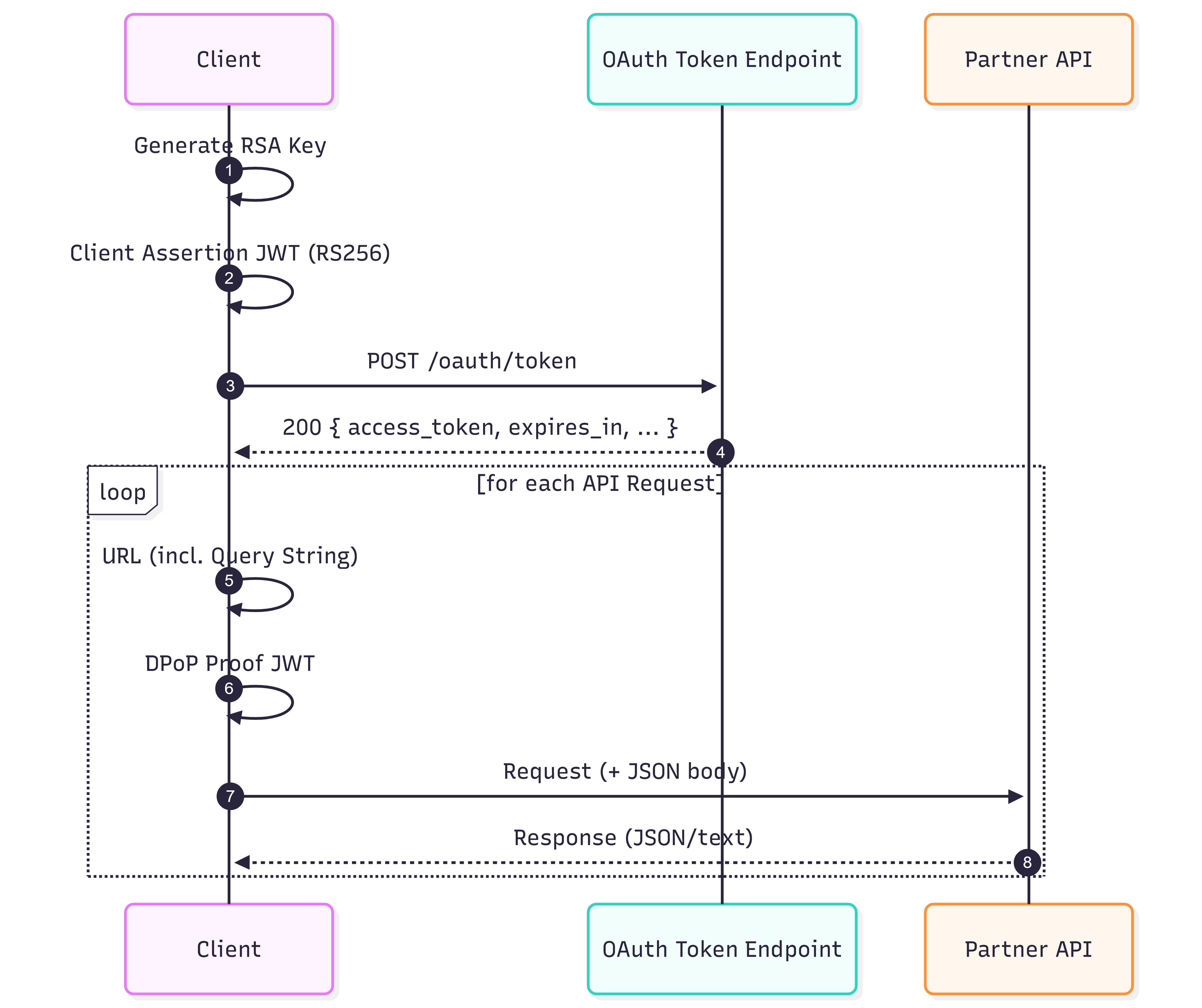
Process
- Key Pair: Organization creates RSA Key Pair in Claimity (Private Key is stored securely).
- JWT Client Assertion: Client generates a short-lived JWT (RS256).
- Token Request: Client sends POST /v1/oauth/token (Client-Credentials + Assertion).
- Validation: Auth server checks signature of the assertion and permissions and returns Token Response.
- Query URL: The client creates the query URL (incl. query parameters).
- DPoP Proof: Client creates a DPoP JWT (ES256) per request bound to method + URL.
- API Call: Client calls endpoint with Authorization: DPoP access_token and DPoP: ….
- Response: API checks Token/DPoP and processes the request / returns the response.
Read Access Token
For partner integrations, your organization authenticates via a signed JWT Client Assertion.
Prerequisites
- •Client ID (e.g. org-expo-00001) readable from Claimity organization settings
- •Private RSA Key from Claimity organization settings (keep safe and never share)
Token Endpoint
| URL | POST https://app.claimity.ch/v1/oauth/token |
| Content-Type | application/x-www-form-urlencoded |
| Form Fields | grant_type = client_credentials client_id = <Your client id> client_assertion_type = urn:ietf:params:oauth:client-assertion-type:jwt-bearer client_assertion = <JWT (RS256)> scope (optional) |
URL
Content-Type
Form Fields
JWT Client Assertion (RS256)
The assertion is a short-lived JWT (10 minutes) and is signed with your RSA Private Key.
- •iss/sub = client_id
- •aud = https://app.claimity.ch/realms/claimity/protocol/openid-connect/token
- •jti = UUID (unique)
- •iat/exp = “now” / “now+90s”
- •kid (optional)
curl -X POST \
  'https://app.claimity.ch/v1/oauth/token' \
  -H 'Content-Type: application/x-www-form-urlencoded' \
  -d 'grant_type=client_credentials' \
  -d 'client_id=org-expo-00001' \
  -d 'client_assertion_type=urn:ietf:params:oauth:client-assertion-type:jwt-bearer' \
  -d 'client_assertion=<RS256-JWT-CLIENT-ASSERTION>' \
  -d 'scope=roles'
Token Response
The response contains an access_token. Important: For API calls, this token is used as a DPoP Token.
Send API Requests
Every request additionally requires a DPoP Proof JWT. This is generated per request and signed (ES256) and binds the request to method + URL.
Required Headers
| Authorization | DPoP {access_token} |
| DPoP | {dpop_proof_jwt} |
| Accept | application/json |
| Content-Type | application/json |
Authorization
DPoP
Accept
Content-Type
DPoP Proof Content
- •htu must be the exact URL incl. query string
- •htm must correspond exactly to the HTTP method (GET/POST/PUT/DELETE)
- •jti must be new per request (no replays)
- •iat must be within the allowed time window (avoid clock skew)
- •ath = base64url(SHA-256(access_token))
curl -X GET \
  'https://app.claimity.ch/v1/experts/cases?page=1&size=50' \
  -H 'Accept: application/json' \
  -H 'Authorization: DPoP {access_token}' \
  -H 'DPoP: {dpop_proof_jwt}'
Troubleshooting: 401 invalid_dpop
Common causes:
- •htu mismatch: URL must be exact incl. query
- •htm mismatch: Method must match
- •iat outside window: Correct system time
- •replay: jti must be new per request
- •ath mismatch: SHA-256(access_token) base64url
API Basics
Core concepts and conventions used throughout the API.
Request Format
Every request consists of Method, URL, optional Query Parameters, Headers and (for POST/PUT) a JSON Body.
URL Structure
HTTP Methods
Typical Headers
- •Accept: application/json
- •Content-Type: application/json (for JSON Body)
- •Authorization: DPoP <access_token>
- •DPoP: <dpop_proof_jwt>
Response Format
Responses are generally JSON (Content-Type: application/json) and use HTTP status codes to signal success/error.
Success Responses
- •2xx (e.g. 200, 201, 204)
- •Body usually contains an object or a list
HTTP/1.1 200 OK
Content-Type: application/json

{
  "id": "…",
  "…": "…"
}
Error Responses (ProblemDetails)
- •4xx/5xx (e.g. 400, 401, 403, 404, 429, 500)
- •Body follows a ProblemDetails-like structure
HTTP/1.1 400 Bad Request
Content-Type: application/json

{
  "type": "about:blank",
  "title": "Bad Request",
  "status": 400,
  "detail": "…"
}
Rate Limiting
The Partner API is protected by rate limiting to ensure fair usage and stability. Limits are applied per client partition.
Standard for Partner API
For standard endpoints, the number of requests is slightly limited.
- •TokenBucket: approx. 60 Requests/Minute, Burst up to 20, Queue 0
Document Routes
For endpoints with .../documents..., stricter limits apply (e.g. for upload/download).
- •TokenBucket: approx. 20 Requests/Minute, Burst up to 10, Queue 0
Token Endpoint
The token endpoint is strictly limited to prevent possible attacks.
- •Fixed Window: 10 Requests/Minute per Client
When a limit is reached (HTTP 429)
- •Response: 429 Too Many Requests (Rejection Code 429)
- •Optional Header: Retry-After
- •Diagnostic/Policy Hint: X-RateLimit-Policy
- •Body: Problem JSON
Recommendations for Clients
- •Retry 429 requests with backoff and respect Retry-After.
- •Throttle document uploads/downloads.
- •Bursts are limited (no queuing) – high parallelism leads to 429 faster.
Experts
Endpoints for experts to work with cases, documents, and report submissions.
Cases
Case Documents
Reports & Submissions
Submission Documents
Insurers
Endpoints for insurers to create/validate/retrieve claims, documents, and report overviews.
Claims
Claim Documents
Reports on Claims
Case Structure & Validation
Each category precisely describes which fields the payloadJson may contain.
Category
Vehicle Appraiser
This structure is intended for payloads for the category Vehicle Appraiser.
Vehicle Appraiser
Test PayloadJson directly
Send a request to the Claimity Validation API and get immediate feedback on your payload.
Expects a valid JSON structure.
Response
ReadyThe validation API response appears here.
- Select category
- Insert Payload JSON or use example
- Validate Payload